투자 프로세스에서 가장 선행되어야 할 것은 좋은 기업을 찾는 일이다. 퀀트 투자에서 스크리닝 단계는 넓고 단순한 분석에서 출발해 좁고 복잡한 분석으로 이어진다. 동일 집단 내 상대적으로 재무 상태가 양호한 기업들을 스크리닝해 투자 후보군을 추려내면 이후 후보군에 대해 여러 가지 가치평가 및 안전마진 계산을 수행한다.
어떤 기준으로 후보군을 추려낼 것인지 명확하지 않을 때는 대표적인 재무 멀티플을 사용해 볼 수 있다. 야후 파이낸스 파이썬 패키지는 이미 계산된 멀티플을 제공하고 있으니 이를 활용해 미국 상장 소프트웨어 기술 기업 중 재무 상태가 양호한 후보군을 추려내는 작업을 진행해 보자.
1. yfiance로 주요 기업 티커 및 재무 지표 추출
타깃 시장의 모든 티커를 추출하는 함수와 멀티플을 추출하는 함수를 작성한다.
# import libraries to get financial statement data
# Import required libraries
import pandas as pd
import numpy as np
import yfinance as yf
import requests
import json
from datetime import datetime, timedelta
import matplotlib.pyplot as plt
import seaborn as sns

def get_symbols(region='us', sector='Technology', peer_group='Software & Services'):
    # Get software & services tickers from Yahoo Finance
    query = yf.EquityQuery('and',[
    yf.EquityQuery('EQ',['region', region]),
    yf.EquityQuery('EQ',['sector', sector]),
    yf.EquityQuery('EQ',['peer_group', peer_group])
    ])

    offset = 0
    size = 250
    res = yf.screen(query=query, offset=0, size=250, sortAsc=True)
    df_symbols = pd.DataFrame(res['quotes'])[['symbol','shortName']]

    if res['total'] > size:
        for i in range(res['total']//size):
            offset += size
            res = yf.screen(query=query, offset=offset, size=size, sortAsc=True)
            df_symbols = pd.concat([df_symbols, pd.DataFrame(res['quotes'])[['symbol','shortName']]])

    df_symbols.reset_index(drop=True, inplace=True)
    return df_symbols

def get_valuation_multiples(symbol):
    def safe_get(info_dict, key):
        try:
            result = info_dict.get(key)
            if result is None:
                print(f"Warning: {key} returned None")
            return result
        except:
            print(f"Error getting {key}")
            return None

    def safe_ratio(info_dict, numerator_key, denominator_key):
        try:
            numerator = safe_get(info_dict, numerator_key)
            denominator = safe_get(info_dict, denominator_key)
            if numerator is None or denominator is None:
                print(f"Warning: Could not calculate ratio {numerator_key}/{denominator_key} - numerator or denominator is None")
                return None
            if denominator == 0:
                print(f"Warning: Could not calculate ratio {numerator_key}/{denominator_key} - denominator is 0")
                return None
            return numerator / denominator
        except:
            print(f"Error calculating ratio {numerator_key}/{denominator_key}")
            return None

    # Get info and initialize multiples dict
    info = yf.Ticker(symbol).info
    multiples = {}

    # Direct values
    multiples['PER'] = safe_get(info, 'trailingPE')
    multiples['PBR'] = safe_get(info, 'priceToBook')
    multiples['EV/Revenue'] = safe_get(info, 'enterpriseToRevenue')
    multiples['EV/EBITDA'] = safe_get(info, 'enterpriseToEbitda')
    multiples['PEG'] = safe_get(info, 'trailingPegRatio')
    multiples['Profit Margin'] = safe_get(info, 'profitMargins')
    multiples['Operating Margin'] = safe_get(info, 'operatingMargins')
    multiples['ROA'] = safe_get(info, 'returnOnAssets')
    multiples['ROE'] = safe_get(info, 'returnOnEquity')
    multiples['Beta'] = safe_get(info, 'beta')
    multiples['Debt/Equity'] = safe_get(info, 'debtToEquity')

    # Calculated ratios
    multiples['Cash/Revenue'] = safe_ratio(info, 'totalCash', 'totalRevenue')
    multiples['Debt/Revenue'] = safe_ratio(info, 'totalDebt', 'totalRevenue')

    return multiples
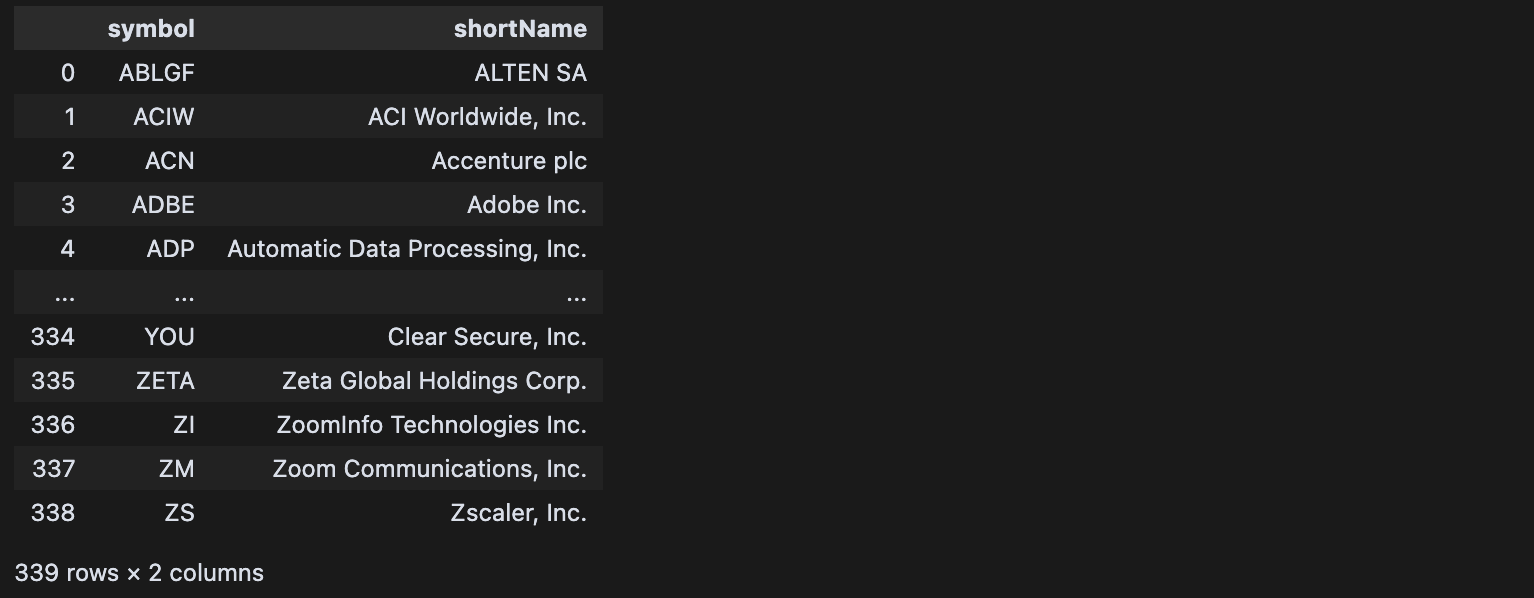
get_symbols() 함수를 기본 인자로 실행하면 아래와 같이 339개의 티커명, 기업명을 가져올 수 있다.
이어서 각 티커마다 순회하며 필요로 하는 멀티플을 추출해 데이터프레임으로 생성해 준다.
df_symbols = get_symbols()

# Create empty list to store results
results = []

# Iterate through each symbol
for idx, row in df_symbols.iterrows():
    # Get valuation multiples for current symbol
    multiples = get_valuation_multiples(row['symbol'])

    # Combine symbol, shortname and multiples into dict
    result_dict = {
        'symbol': row['symbol'],
        'shortName': row['shortName']
    }
    result_dict.update(multiples)

    # Append to results list
    results.append(result_dict)

    # Print progress
    print(f"Processed {idx+1}/{len(df_symbols)} symbols")

# Create dataframe from results
df_results = pd.DataFrame(results)
df_results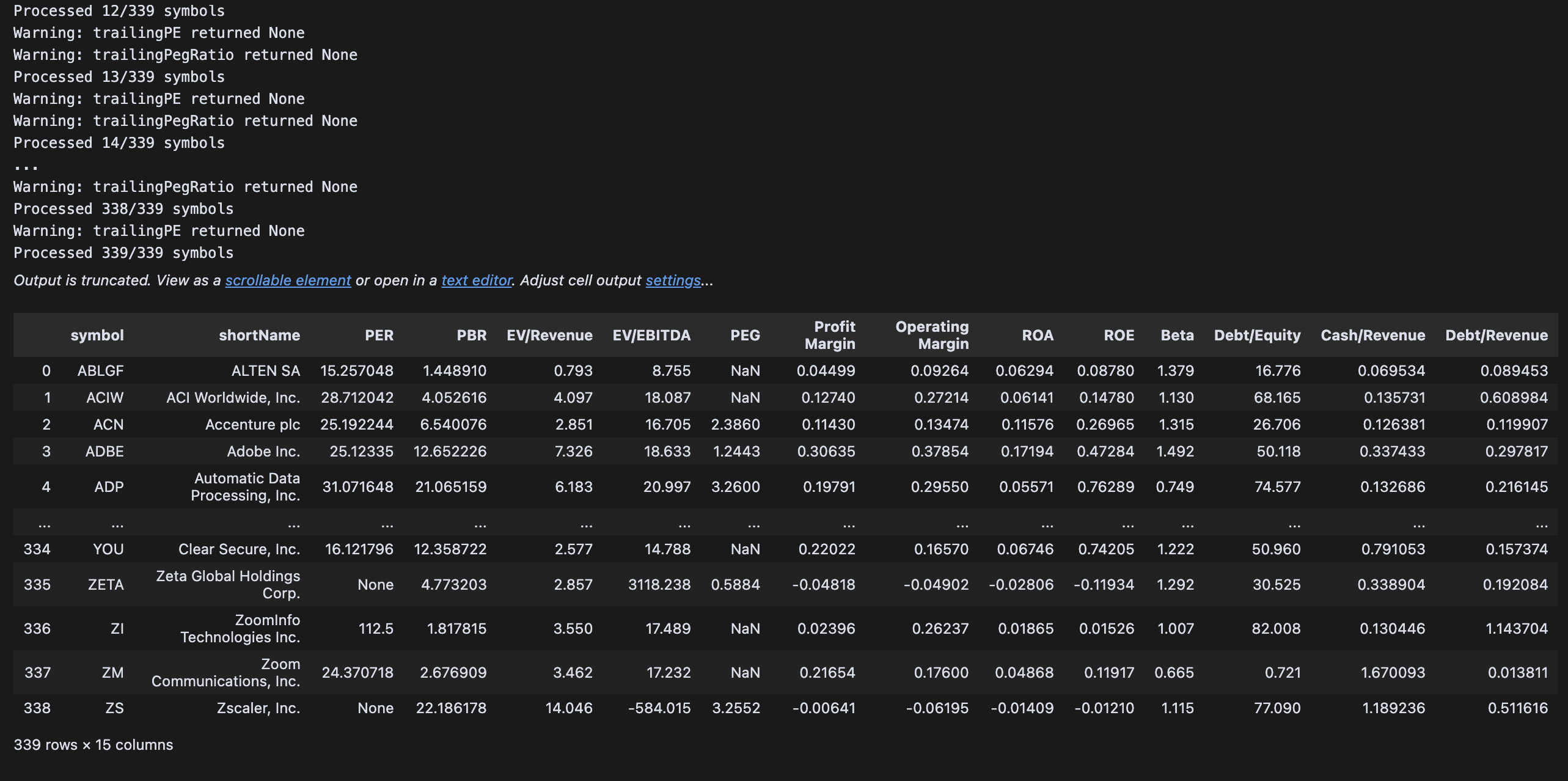
위 출력된 Warning에 작성된 것처럼 티커마다 특정 멀티플은 제공하지 않는 경우가 있는데, 간단한 수식이라 굳이 yfinance가 제공하는 데이터에 제한하지 않고 직접 계산할 수도 있다. 여기서 이 작업은 생략하고, 멀티플 중 하나라도 누락된 값이 있으면 해당 티커는 제외하겠다.
df_results_womissing = df_results.dropna().reset_index(drop=True)
df_results_womissing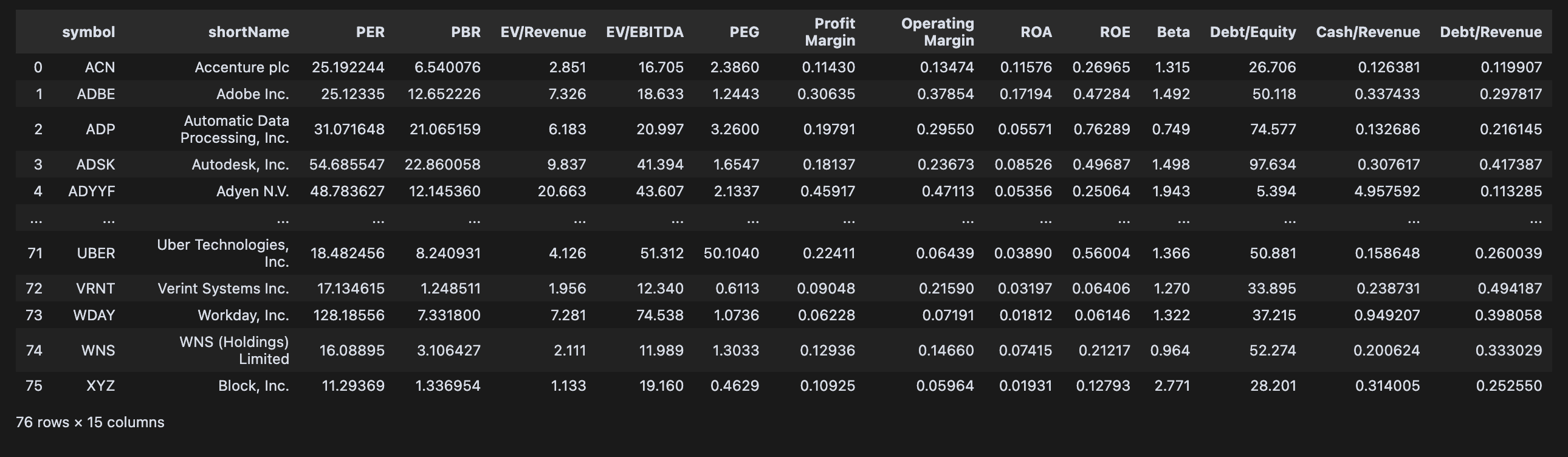
2. 상호 독립적인 멀티플 추출
다각도의 재무 상태를 살피기 위해 많은 멀티플을 필요로 하진 않는다. 오히려 총 13개나 되는 멀티플을 모두 고려하면 자칫 비슷한 지표들, 혹은 연관 지표들의 가중치가 강하게 들어가 특정 재무 지표에 쏠린 후보군이 만들어질 수 있다.
따라서 상관분석을 통해 서로 연관성이 0에 가까운 지표들을 추출하겠다. 우선 상관도 히트맵을 그려보면 함께 움직이는 지표들, 그리고 반대로 움직이는 지표들을 수치로 확인할 수 있다.
#visualize correlation matrix
plt.figure(figsize=(8, 4))
sns.heatmap(df_results_womissing.iloc[:,2:].corr(), annot=True, cmap='coolwarm', annot_kws={'size': 6})
plt.show()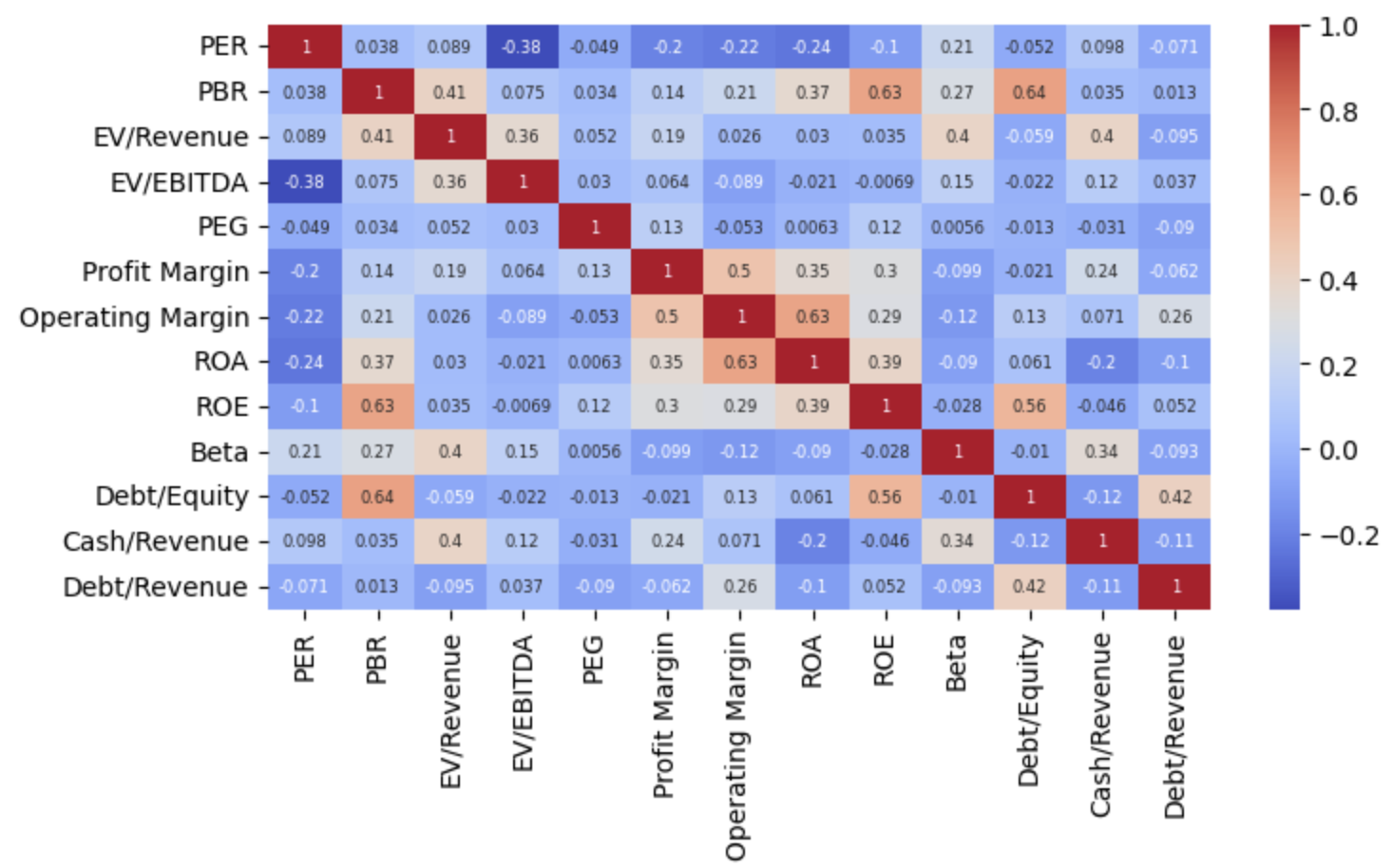
이 모든 지표들 중 자기 자신을 제외한 다른 지표로부터의 영향도(상관계수) 절댓값이 0.1보다 낮은 지표들을 아래와 같이 추출한다.
# Find multiples with correlation < 0.1 (low correlation)
low_corr = abs(df_results_womissing.iloc[:,2:].corr()) < 0.1

# Initialize list to store independent multiples
independent_multiples = []

# Start with first multiple
remaining_cols = list(low_corr.columns)
current_col = remaining_cols[0]
independent_multiples.append(current_col)
remaining_cols.remove(current_col)

# Find additional multiples that are uncorrelated with all selected ones
while remaining_cols:
    for col in remaining_cols[:]:
        # Check if column is uncorrelated with all selected multiples
        is_independent = True
        for selected in independent_multiples:
            if not low_corr.loc[selected, col]:
                is_independent = False
                break

        if is_independent:
            independent_multiples.append(col)
            remaining_cols.remove(col)

    # If no more independent multiples found, break
    if not any(col in remaining_cols for col in independent_multiples):
        break

print("Independent multiples with no correlation to each other:")
print(independent_multiples)

low_corr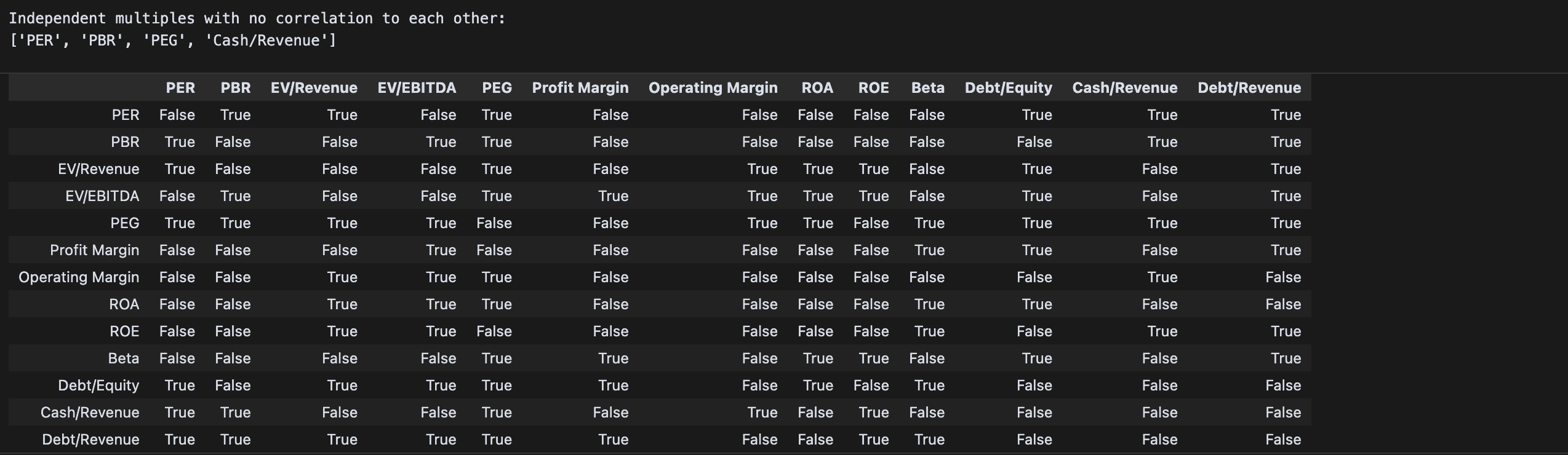
이렇게 추출한 독립 요인들의 상관계수를 별도로 히트맵으로 그려보면 모든 상관계수가 0에 근접함을 확인할 수 있다.
plt.figure(figsize=(6, 3))
sns.heatmap(df_results_womissing[independent_multiples].corr(),
            annot=True,
            cmap='coolwarm',
            center=0,
            fmt='.3f',
            annot_kws={'size': 6})
plt.title('Correlation Heatmap of Independent Multiples', size='small')
plt.xticks(size='small')
plt.yticks(size='small')
plt.tight_layout()
plt.show()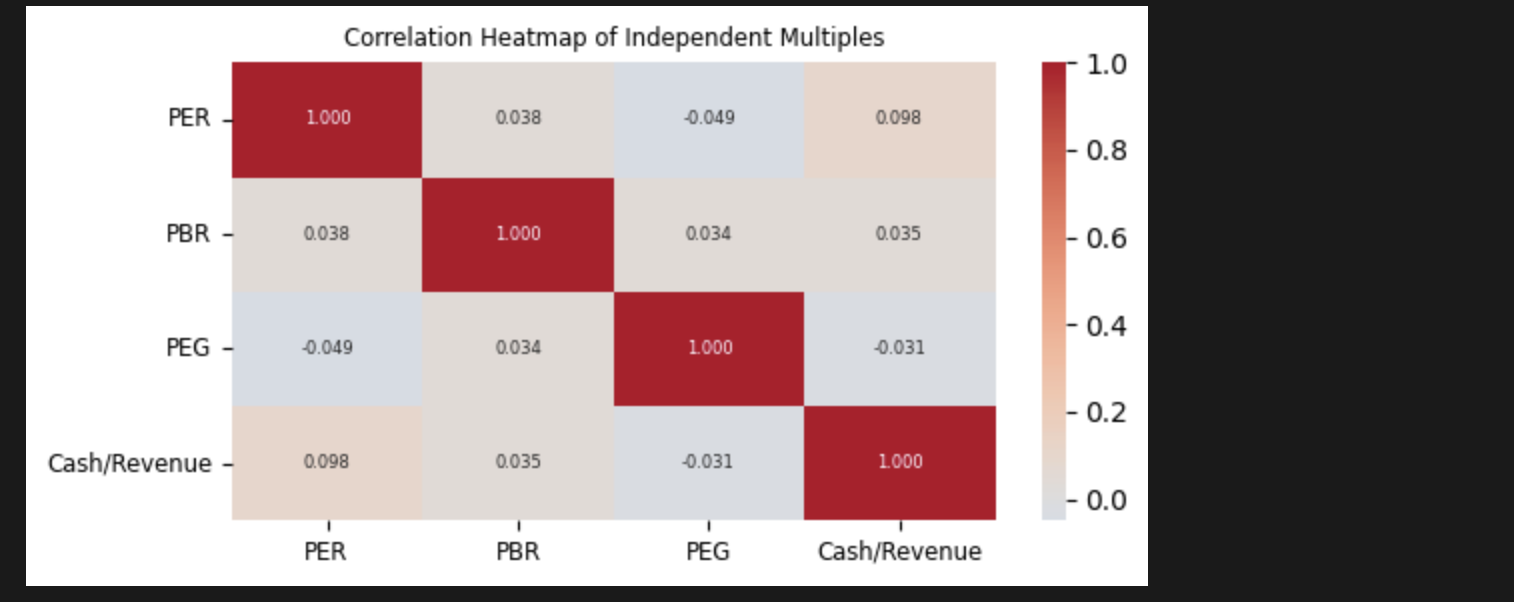
3. 타깃 멀티플 기준 최상위 기업 선별
앞서 기업 선별에 활용할 멀티플을 PER, PBR, PEG, Cash/Revenue로 타겟팅했다. Cash/Revenue는 높을수록 좋고, 그 외는 분자가 가격이므로 낮을수록 좋다. 이 기준으로 각 기업들을 정렬해 보자.
# Create 2x2 subplots
n_metrics = len(independent_multiples)
fig, axes = plt.subplots(2, 2, figsize=(12, 6))
axes = axes.flatten()

# Plot bar chart for each metric
for i, metric in enumerate(independent_multiples):
    if i >= 4:  # Only show first 4 metrics
        break

    # Sort data by metric and get top 20 companies
    # Sort ascending for all metrics except Cash/Revenue
    ascending = True if metric != 'Cash/Revenue' else False
    data = df_results_womissing.sort_values(by=metric, ascending=ascending).head(20)

    # Create bar plot
    sns.barplot(data=data, x='symbol', y=metric, ax=axes[i])

    # Customize plot
    sort_direction = "Lowest" if ascending else "Highest"
    axes[i].set_title(f'{sort_direction} 20 Companies by {metric}', fontsize=10)
    axes[i].tick_params(axis='x', rotation=45, labelsize=8)
    axes[i].tick_params(axis='y', labelsize=8)
    axes[i].set_xlabel('Company Symbol', fontsize=8)
    axes[i].set_ylabel(metric, fontsize=8)

plt.tight_layout()
plt.show()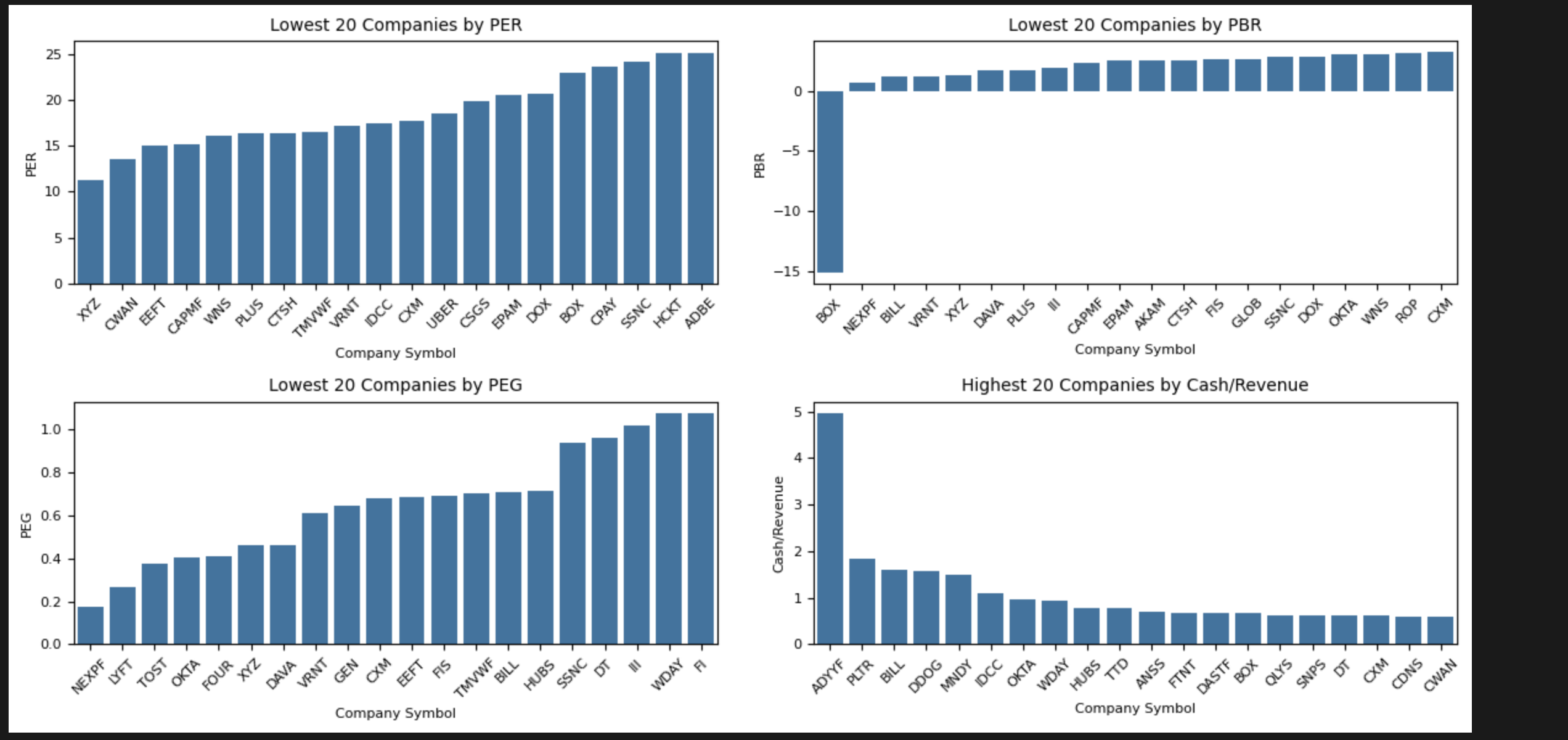
PBR의 경우 지표가 0보다 낮으면 자본잠식 상태임을 고려하고, 나머지 정렬 상태를 확인한다. 종합 순위를 매기기 위해 각 지표별 순위를 매기고 4개 지표의 평균 순위로 후보군 Top 10을 선정한다.
# Create a scoring system based on multiple rankings
# For each multiple, rank companies from 1-n (n being total companies)
# Lower values are better for all metrics EXCEPT Cash/Revenue where higher is better

scoring_metrics = independent_multiples.copy()
df_scores = df_results_womissing.copy()

for metric in scoring_metrics:
    # For all metrics except Cash/Revenue, lower is better so ascending=True
    # For Cash/Revenue, higher is better so ascending=False
    ascending = False if metric == 'Cash/Revenue' else True

    # Rank companies for this metric (1 is best)
    df_scores[f'{metric}_rank'] = df_scores[metric].rank(ascending=ascending)

# Calculate average rank across all metrics
rank_columns = [col for col in df_scores.columns if col.endswith('_rank')]
df_scores['avg_rank'] = df_scores[rank_columns].mean(axis=1)

# Sort by average rank and get top 10 companies
top_10_companies = df_scores.sort_values('avg_rank').head(10)

# Display results with key metrics
display_columns = ['symbol', 'shortName'] + independent_multiples + ['avg_rank']
print("\nTop 10 Companies Based on Multiple Analysis:")
print(top_10_companies[display_columns].to_string(index=False))

# Create visualization of the top 10 companies' metrics
plt.figure(figsize=(8, 4))

# Plot heatmap of metrics for top 10 companies
metrics_data = top_10_companies[independent_multiples]
metrics_data = (metrics_data - metrics_data.mean()) / metrics_data.std()  # Standardize for better visualization

# Convert metrics_data to numeric values and handle any non-numeric values
metrics_data = metrics_data.apply(pd.to_numeric, errors='coerce')

# Create heatmap only if data is numeric
if not metrics_data.isna().all().all():
    sns.heatmap(metrics_data,
                annot=True,
                cmap='RdYlGn_r',
                xticklabels=independent_multiples,
                yticklabels=top_10_companies['symbol'],
                fmt='.2f',
                annot_kws={'size': 6})  # Smaller annotation font size

    plt.title('Standardized Metrics Heatmap for Top 10 Companies', fontsize=8)
    plt.xticks(fontsize=8, rotation=45)  # Smaller x-axis labels
    plt.yticks(fontsize=8)  # Smaller y-axis labels
    plt.tight_layout()
    plt.show()
else:
    print("Error: No numeric data available for heatmap visualization")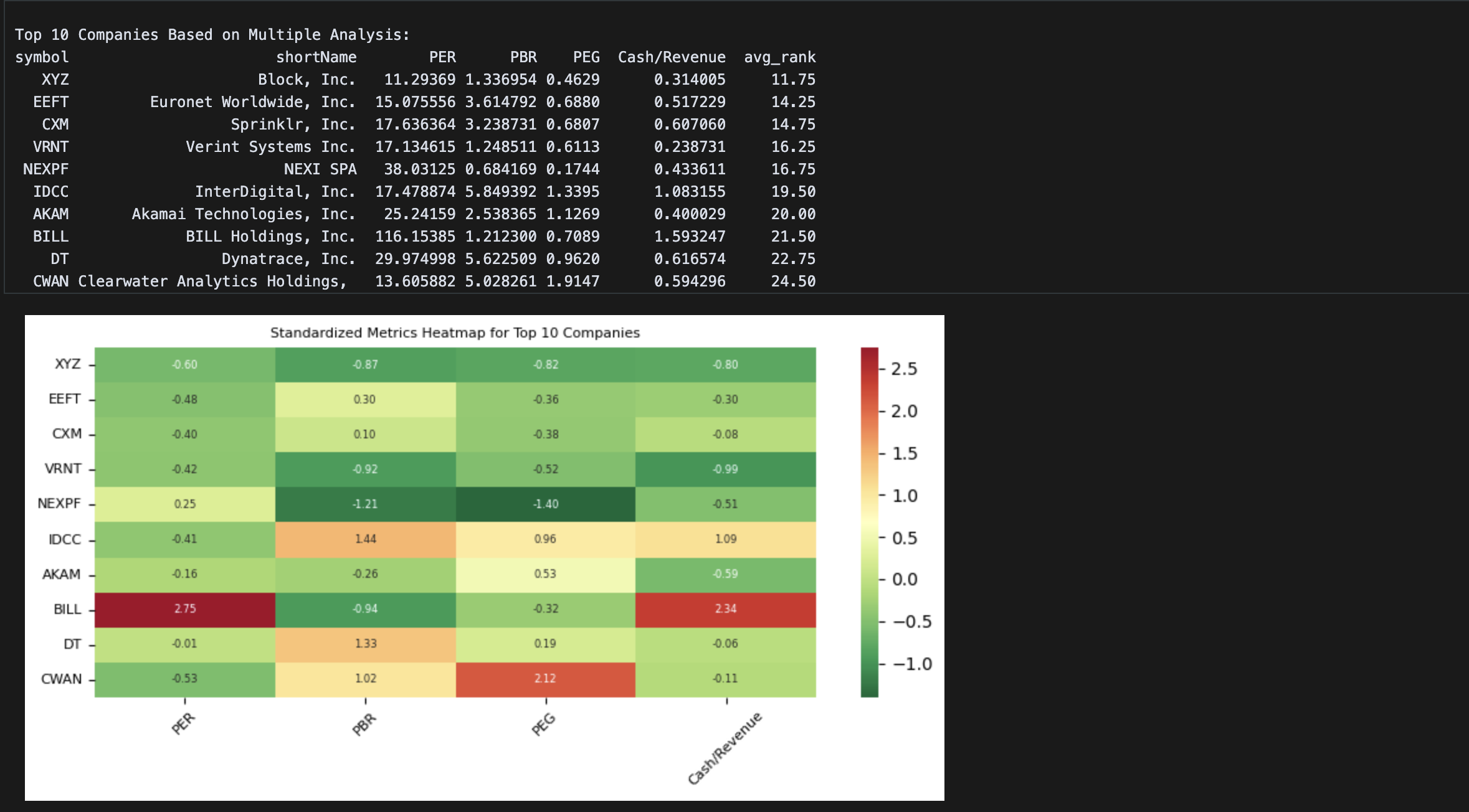
종합 순위로 정렬하고, 각 값을 지표별 0을 중심으로 표준화하여 히트맵으로 표현했다. 잭 도시가 창업한 미국 모바일 결제 기업 XYZ를 포함한 상위 두 개의 기업이 전자 결제 서비스, 다음은 고객관리 서비스 두 기업이 뒤를 잇는다.
동종 산업군의 각 지표 평균을 보면 언급한 기업들의 상대적 우위를 확인할 수 있다.
# Calculate average scores across all companies for comparison
avg_scores = df_scores[independent_multiples].mean()

# Create figure with multiple subplots for each metric
fig, axes = plt.subplots(2, 2, figsize=(15, 10))
axes = axes.ravel()

# Plot each independent multiple as a bar chart
for i, metric in enumerate(independent_multiples):
    ax = axes[i]
    x = np.arange(len(top_10_companies['symbol']))
    width = 0.35

    # Plot company values
    ax.bar(x, top_10_companies[metric], width, label='Company Value', alpha=0.7)

    # Plot market average as horizontal line
    ax.axhline(y=avg_scores[metric], color='r', linestyle='--',
               label=f'Market Average ({avg_scores[metric]:.2f})')

    ax.set_title(f'{metric} Comparison')
    ax.set_xlabel('Companies')
    ax.set_ylabel('Value')
    ax.set_xticks(x)
    ax.set_xticklabels(top_10_companies['symbol'], rotation=45)
    ax.legend()

plt.suptitle('Top 10 Companies vs Market Average - Key Metrics', fontsize=14)
plt.tight_layout()
plt.show()

# Print numerical comparison
comparison = pd.DataFrame({
    'Market Average': avg_scores,
    'Top 10 Average': top_10_companies[independent_multiples].mean()
})
print("\nNumerical Comparison with Market Averages:")
print(comparison.round(3))
저렴한 기업을 무작정 매수하는 것이 아닌 좋은 기업을 낮은 가격에 매수하는 것이 투자 전략의 핵심이다. 따라서 저렴한 자산을 스크리닝 하기에 앞서 위와 같이 펀더멘탈이 양호한 기업들을 먼저 선별하는 것이 매우 중요하다.